How to Upload a Document to Companies House: Eligible Documents, Steps and Fees

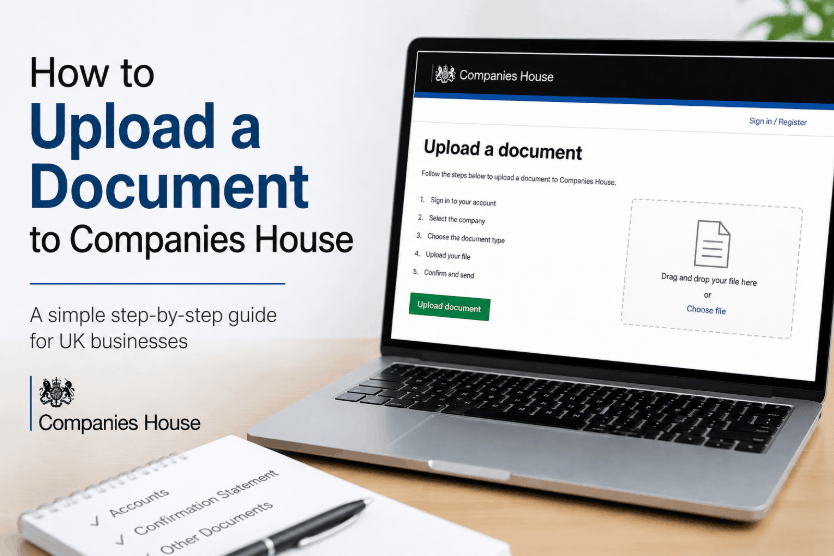
Upload a document to Companies House is an online service that lets users file certain documents as a PDF instead of posting them on paper. Its eligible forms, fees and rules were checked in October 2026.
It covers six areas, including share capital, change of constitution and insolvency. It accepts one PDF under 4MB at a time and charges a fee only for some documents.
Key Takeaways
- Companies House accepts six areas of documents, from share capital to insolvency, as one PDF under 4MB per upload.
- Accounts, confirmation statements and SH01 share allotment forms cannot be uploaded; they use separate online filing services.
- As of October 2026, a reduction-of-capital statement (SH19) costs £20, or £89 for same-day processing, paid by card.
Which Documents Can You Upload to Companies House?
The upload service accepts documents in six areas, and its guidance gives articles and resolutions a heading of their own. Eligibility depends on the document rather than the company.
The same company can upload a resolution but must file a director change through WebFiling, Companies House’s account-based filing service.
| Area | What it covers | Form codes |
|---|---|---|
| Share capital | Share changes, directors’ statements, solvency statements and resolutions | SH02, SH04 to SH17, SH19 |
| Registrar’s powers | Objecting to a register correction, removing director material, disputed office addresses | RP03, RP06, RP07 |
| Change of constitution | Changes to a company’s articles or objects | CC01, CC02, CC04, CC05, CC06 |
| Articles and resolutions | New articles of association and special, written or ordinary resolutions | No form code |
| Scottish limited partnerships | Confirmation statements and notices of people with significant control (PSC) | SLP CS01, SLP PSC01 to PSC09 |
| Scottish qualifying partnerships | Confirmation statements, changes and PSC notices | SQP CS01, SQP2, SQP3, SQP PSC01 to PSC09 |
| Insolvency | Most insolvency forms, filed by registered insolvency practitioners or the Official Receiver | Forms under the Insolvency Rules 2016, plus AD01 |
Common share capital codes include SH02 (consolidating, sub-dividing or redeeming shares), SH06 (cancelling shares) and SH19 (reducing capital).
Registered insolvency practitioners and the Official Receiver can upload most insolvency documents, including moratorium forms and forms under the Insolvency Rules 2016. Documents for an overseas entity are excluded entirely.
Companies House launched the service to enable paperless filing during the coronavirus outbreak, and it still carries an Alpha label. It covers forms that were previously delivered only by post or in person.

What Cannot Be Uploaded, and Where Does It Go Instead?
Annual accounts, confirmation statements and most routine company changes cannot be uploaded, because the service exists for forms that were previously paper-only.
Anything already filed online stays on WebFiling or on filing software.
- Annual accounts: Filed through the accounts service, using WebFiling or filing software.
- Confirmation statements (CS01): Filed through the confirmation statement service, using WebFiling or filing software.
- Return of allotment of shares (SH01): Filed through WebFiling.
- Director and secretary changes (AP01, TM01, CH01): Filed through WebFiling or filing software.
- Incorporation, name changes, strike-off applications and mortgage charges (IN01, NM01, DS01, MR01): Filed through WebFiling.
- Registered office changes (AD01): Filed through WebFiling, although registered insolvency practitioners and the Official Receiver can upload AD01.
- SH19 supported by a court order: Sent by post.
- Name-change and community interest company conversion resolutions, and overseas entity documents: Not accepted by the upload service.
The upload service does not list SH03, the return of a company’s purchase of its own shares. Where Stamp Duty is payable because the amount or value of the consideration is over £1,000, the form must be sent to HMRC first.
HMRC’s confirmation letter must then be submitted to Companies House with the SH03. Ask Companies House to confirm the filing route for an SH03 before submitting it.
For anything that cannot be filed online, send paper forms to the correct postal address, because post sent to the wrong address is redirected.
Which Login Does the Upload Service Use: WebFiling or GOV.UK One Login?
The upload service’s start page asks users to “sign in, or create sign in details”, and it does not mention WebFiling.
WebFiling is a separate service for filing accounts, confirmation statements and company changes. Since 13 October 2025, WebFiling users must connect their account to GOV.UK One Login, the government’s single sign-in, according to gov.uk.
Companies House has stated an exception for customers filing mortgage charges using the WebFiling service.
For a Companies House account used on Find and update company information, existing users can continue using their existing sign-in details for now, while GOV.UK One Login is becoming the main sign-in option and is required for new users.
Start from the upload service’s own sign-in page, and create sign-in details there if prompted. If One Login sign-in fails, check the GOV.UK One Login status page.

How to Prepare Your Document Before You Upload It
Prepare each document as a finished PDF under 4MB before starting.
- Download the form from gov.uk, then type into it, or print it, fill it in with black ink and scan it.
- Sign digitally, by typing, by scanning or in black ink, but leave out any signature certificate, because Companies House rejects documents that include one.
- Upload the document only, as cover letters are not accepted.
- Merge continuation pages into the main document so the file uploads as one PDF.
- Keep the company authentication code, which confirms you may file for the company, to hand, as some document types ask for it.
- Have a debit or credit card ready if the document carries a fee.
- For an RP07, gather evidence such as proof of rights in the address, a written agreement or a utility bill dated within six months. Up to nine files can be added, and applications without evidence are rejected.
How to Upload a Document to Companies House Step by Step
Upload one PDF at a time, and check the eligibility table and the exclusions above first. Upload documents that usually travel together, such as a resolution and a form, as separate submissions. See the SH19 sequence below for a worked example.
- Open the Upload a document to Companies House service and select Start now.
- Sign in, or create sign-in details.
- Choose the document area and type that match your form.
- Enter the company authentication code if the service asks for it.
- Select your PDF, which must be under 4MB.
- Pay by debit or credit card if the document has a fee.
- Submit the document and look for the confirmation email.
- Restart the service for each further document, using the link on the confirmation page.
How Much Does Uploading Cost, and How Long Does It Take?
Only some documents carry a fee, and only card payment is accepted; a Companies House payment account cannot be used. Fees reflect the upload guidance as read in October 2026.
Check the form itself, or the document list in the upload guidance, to see whether a document carries a fee.
| Document | Fee | Processing time |
|---|---|---|
| SH19, standard service | £20 | Within 10 to 14 days |
| SH19, same-day service | £89 | Same working day if the SH19, resolution and solvency statement arrive by 11 AM |
| SH19, same-day service after 11 AM | £89 | Next working day |
| Scottish limited partnership confirmation statement (SLP CS01) | £110 | Not stated in the guidance |
| Scottish qualifying partnership confirmation statement (SQP CS01) | £110 | Not stated in the guidance |
Official guidance distinguishes between online and paper filing: Companies House aims to process most online filings within 24 hours, while posted paper documents can take a week or more. The upload guidance itself gives a processing time only for SH19.
A confirmation email follows each upload, and an examiner then checks whether the document is acceptable.
An accepted document is registered with its upload date. A rejected document’s fee goes back to the original payment method, which can take up to seven days.
How to Upload an SH19 and Its Supporting Documents in Order
Upload the supporting documents one at a time first, and the SH19 last.
The sequence below uses hypothetical clock times to show how the official rules combine for the same-day service.
- 9:30 AM: Upload the resolution as its own PDF.
- 9:35 AM: Restart the service using the link on the confirmation page, then upload the solvency statement.
- 9:40 AM: Restart again and upload the statement by directors, if the reduction needs one.
- 9:45 AM: Restart once more, upload the SH19 last, choose the same-day service and pay £89 by card.
- After each upload, look for the confirmation email, then wait for the examiner’s decision by email.
For same-day processing, the SH19, resolution and solvency statement must all arrive by 11 AM. Later uploads are processed the next working day. Uploading each document soon after the last lets Companies House process them together; otherwise, some may be rejected for missing supporting documents.
An SH19 supported by a court order cannot use the upload service and goes by post.
How Do You Upload a Special Resolution to Companies House?
Save the resolution as its own PDF and upload it under the Resolution option. A special resolution is a shareholder decision passed by at least 75% of the votes, and a copy must reach Companies House within 15 days.
The upload service accepts it as a standalone PDF, separate from new articles of association.
It does not accept resolutions that change a company name or convert a company to a community interest company. Upload new articles of association separately, because the service takes one document at a time.
A written resolution, a shareholder decision passed without a meeting, is filed in the same way. Ordinary resolutions generally need filing only in specific cases, and missing the 15-day deadline for a special resolution breaches a statutory filing duty.

What Scottish Limited and Qualifying Partnerships Can Upload
Scottish limited partnerships (SLPs) and Scottish qualifying partnerships (SQPs) have their own form families on the upload service. Each has a confirmation statement, SLP CS01 or SQP CS01, carrying a £110 fee.
Notices about people with significant control (PSC), numbered PSC01 to PSC09, show no fee in the guidance.
SQPs also have SQP2, a notice of change of details, and SQP3, a notice of ceasing to be an SQP. GOV.UK’s list of WebFiling filings covers limited companies and limited liability partnerships, and omits Scottish partnership forms.
What to Do If a Companies House Upload Is Rejected or Not Working
Read the rejection email first, because Companies House uses it to explain what to do next.
- Correct the fault named in the email, then upload the document again.
- Check the file is a PDF under 4MB with no cover letter or signature certificate.
- Confirm the document is not excluded, such as a name-change resolution or an SH19 supported by a court order.
- For a reduction of capital, upload the supporting documents first and the SH19 last.
- If the service will not load, check the service availability and planned maintenance notices on the Companies House services page on gov.uk, then retry.
- If sign-in fails, check the GOV.UK One Login status page.
- If the problem continues, phone Companies House on 0303 1234 500 (Monday to Friday, 8:30 AM to 6 PM) or email enquiries@companieshouse.gov.uk.
The refund described above follows a rejection, and no waiting period is published before a corrected document is resubmitted.
The published guidance describes no step for withdrawing a document already submitted by mistake. Questions about a submission go to Companies House by phone or email.
Conclusion
To upload a document to Companies House, confirm it falls within the eligible areas, prepare a PDF under 4MB, sign in through the service’s own page and submit one file at a time.
Check the latest guidance before filing, as eligible forms, fees and processing rules can change. If an upload is not working, read the rejection email, check the service notices, then contact Companies House.
FAQs
Is it compulsory to upload a document to Companies House?
No. Paper forms sent by post remain an accepted alternative, although Companies House says uploading is quicker. The deadline for the underlying document, such as 15 days for a special resolution, applies either way.
Can you upload an SH03 to Companies House?
SH03 is not on the upload service’s list of accepted forms. Where Stamp Duty is payable because the amount or value of the consideration is over £1,000, the form must be sent to HMRC first, and the HMRC confirmation letter must accompany it to Companies House.
Can you upload company accounts with this service?
No. Annual accounts are filed through the separate accounts service, either through WebFiling or filing software. The upload service covers only documents in its six listed areas.
Can you upload your ID to Companies House?
No identity documents appear among the six document areas the upload service accepts. Identity verification is a separate legal requirement, completed through the ‘Verify your identity for Companies House’ service using GOV.UK One Login or an Authorised Corporate Service Provider. Do not post or email identity documents to Companies House.
Can insolvency documents be uploaded to Companies House?
Yes, but only by registered insolvency practitioners or the Official Receiver. They can upload most insolvency forms, plus form AD01 for a registered office change, using the service.
Disclaimer: This article provides general guidance for informational purposes only and does not constitute formal legal or financial advice.