Small Business IT Support UK: Costs, Packages, Cyber Essentials and Provider Tips

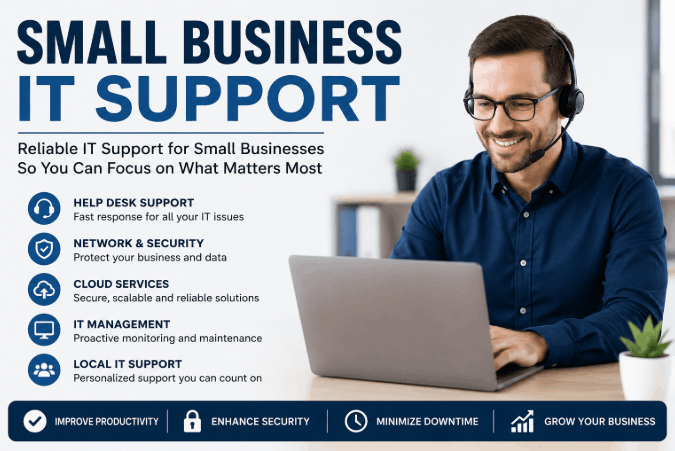
For most UK companies, small business IT support means the ongoing technical assistance that keeps computers, networks, software and data secure and operational, typically delivered through a managed service provider on a fixed monthly fee or pay-as-you-go basis.
As of 2026, most UK providers price this support per user, per month, with cyber security now treated as a core component rather than an optional extra.
Key Takeaways
- Small business IT support in the UK typically costs between £25 and £150 per user per month, depending on whether the model is break-fix, managed, or fully comprehensive.
- Cyber Essentials certification, backed by the NCSC, starts at £320 plus VAT and includes free cyber liability insurance for businesses with a turnover under £20 million.
- Outsourced IT support is typically 40 to 60 percent cheaper than hiring an in-house IT manager for businesses with fewer than 50 staff.
- Organisations with Cyber Essentials certification are 92 percent less likely to make a cyber insurance claim than those without it.
- UK GDPR compliance applies to any small business that stores customer or employee data, regardless of company size.
What Does Small Business IT Support Actually Include?
Small business IT support covers four core areas: helpdesk assistance, network and device management, cyber security, and strategic planning. A provider resolves day-to-day technical problems while also monitoring systems in the background to prevent issues before they disrupt work.
Most packages bundle the following services:
- Remote helpdesk support for password resets, software errors and connectivity issues
- Proactive monitoring of servers, networks and individual devices
- Patch management and software updates applied automatically
- Data backup and disaster recovery planning
- Email and Microsoft 365 or Google Workspace administration
- Cyber security tools including firewalls, antivirus and access controls
A Managed Service Provider (MSP) typically delivers these as a single bundled contract rather than charging separately for each service. This bundling is what distinguishes managed support from older break-fix arrangements, where a business only paid when something went wrong.
Most of these packages also need to talk to whatever finance tools a business already runs, so it is worth checking how well a provider integrates with small business accounting software before signing a contract.
This full scope is worth checking before comparing prices, since a cheap quote that leaves out backup or security monitoring can end up costing more later.

How Much Does Small Business IT Support Cost, and Which Model Fits?
Small business IT support in the UK costs between £25 and £150 per user per month, with the exact figure depending on the pricing model and service level chosen.
Break-fix support is billed hourly and only when something breaks, while managed support charges a predictable fixed fee that includes ongoing monitoring and security.
The table below sets out the main pricing structures found across the UK market in 2026.
| Pricing Model | Typical Cost | What It Covers | Best Suited To |
|---|---|---|---|
| Break-fix (ad hoc) | £75 to £150 per hour | Reactive fixes only, no monitoring | Businesses with minimal IT dependency, such as a sole trader with one laptop |
| Basic managed support | £25 to £55 per user/month | Helpdesk, monitoring, basic security | Small teams wanting predictable costs without full security coverage |
| Comprehensive managed support | £55 to £150 per user/month | Helpdesk, 24/7 monitoring, full cyber security, strategic planning | Growing SMEs relying on shared systems, cloud platforms or sensitive data |
| Fixed-rate per device | Around £20 to £25 per device/month | Reactive and basic preventative support billed per device rather than per user | Businesses with more devices than staff, such as retail or warehousing |
These figures vary by tens of pounds per user across different UK pricing guides because providers bundle different services into the same tier name.
A quote labelled “basic” from one provider may include security monitoring that another provider charges as an add-on, so comparing the included service list matters more than comparing the headline price alone.
Break-fix support suits businesses with very low technology dependence, since costs stay low until something fails.
For any company relying on shared email, cloud storage or customer data, a fixed monthly model from a Managed Service Provider gives more predictable budgeting and catches problems before they cause downtime.
Picking the right model is the first financial decision, though price alone rarely tells the full story.

Managed IT Support vs Break-Fix: Which Model Fits a Small Business?
For most UK small businesses with five or more staff sharing systems, managed IT support is the better long-term choice over break-fix. Managed support replaces unpredictable emergency invoices with a fixed monthly fee, while proactively preventing the downtime that break-fix only reacts to after it happens.
The gap between these two models has widened as cyber threats have grown.
According to the government’s Cyber Security Breaches Survey, a large share of UK businesses report experiencing a breach or attack within the past year, and that figure rises sharply for medium-sized organisations compared to micro businesses.
Break-fix arrangements rarely include the proactive monitoring needed to catch these threats early, since the provider is only paid to respond once a fault is reported.
Consider your business if it relies on shared file storage, customer databases, or any cloud platform for daily operations.
In these cases, the cost of one significant outage or breach typically exceeds a year of managed support fees. Break-fix can still work for very small operations with simple, low-risk technology needs.
How much disruption a business can absorb without warning is really what decides the right model.
Is Outsourced IT Support Worth It for a Small Business?
Outsourced IT support is worth it for most small businesses once technology becomes essential to daily operations, because it delivers expert-level cover and round-the-clock monitoring at a fraction of the cost of an in-house team.
Outsourcing typically costs 40 to 60 percent less than hiring an internal IT manager for businesses under 50 staff. A few signs tend to show outsourced support would benefit a business:
- You currently spend hours each week trying to fix recurring technical problems yourself.
- Your business has no documented backup or disaster recovery process.
- Staff use personal devices or unauthorised apps because IT systems feel slow or unreliable.
- You cannot get a straight answer on response times or what your current support actually includes.
- Your business has grown past five employees sharing the same network or cloud systems.
- You have never had a cyber security audit or vulnerability check.
A single full-time IT manager in the UK typically costs £40,000 to £60,000 a year before training, equipment and benefits.
Hardware decisions add up the same way, and small purchases such as choosing the best card reader for small business use are often handled faster through an outsourced IT or operations partner than by trial and error in-house.
Outsourced support gives access to specialists in networking, cloud platforms and cybersecurity collectively, rather than depending on a single generalist.
For businesses still weighing up bigger decisions beyond IT, the same logic that applies to outsourcing technical support also applies to working with a business coach for a small business, since outside expertise often spots gaps an owner is too close to the day-to-day to see.
A free initial consultation or audit from a provider usually settles any uncertainty, flagging gaps worth fixing now rather than after a problem hits.

Why Cyber Security Has Become Core to Small Business IT Support?
Cyber security is no longer a separate add-on to small business IT support, because most common attacks now target gaps that basic IT maintenance alone does not close.
Multi-Factor Authentication (MFA), patch management and access control sit at the centre of modern support contracts rather than at the edges. This shift reflects the scale of the threat.
The Cyber Security Breaches Survey consistently shows that businesses of all sizes face attempted breaches, and the financial impact of a successful attack, including lost trading time and recovery costs, regularly runs into thousands of pounds for a small business.
Phishing remains the most common attack method, which means staff training is as important as any technical control a provider installs.
A small business that treats security as something bolted onto IT support after a problem occurs is already behind.
Building MFA, regular patching and staff awareness into the core support contract from day one closes the gaps that attackers most often exploit. Formal certification is the natural next step for proving this protection is actually in place.
Do Small Businesses Need Cyber Essentials Certification?
Small businesses do not legally need Cyber Essentials certification, but it is strongly recommended, and it becomes mandatory for any business bidding on UK government contracts involving personal or financial data.
The certification, overseen by the National Cyber Security Centre and delivered through IASME-accredited bodies, verifies that five baseline technical controls are in place.
Cyber Essentials certification costs from £320 plus VAT for the smallest organisations and includes free Cyber Liability Insurance for any UK business with turnover under £20 million, arranged through IASME.
Certification must be renewed annually and is based on a verified self-assessment reviewed by an external assessor. The five technical controls required for certification are:
- Firewalls and internet gateways to filter incoming and outgoing traffic
- Secure configuration of devices and software, removing unnecessary accounts and default settings
- User access control, limiting account permissions to what each role actually needs
- Malware protection across all devices and cloud services
- Security update management, applying patches for known vulnerabilities promptly
Signing a contract with any IT support provider does not automatically mean these controls are covered, though many assume it does.
In practice, many standard support packages handle day-to-day patching and antivirus but do not document or verify the controls in the format Cyber Essentials assessors require.
Businesses planning to bid for public sector work or supply larger companies should confirm directly with their provider whether Cyber Essentials readiness is included or billed separately.
Figures confirmed as of June 2026 via the NCSC and IASME; check the NCSC website for the most current certification pricing.

What Data Protection Rules Apply to Small Business IT Systems?
UK GDPR applies to any small business that collects, stores or processes personal data belonging to customers or employees, regardless of company size or turnover. This includes data held in email systems, customer databases, payroll software and cloud storage platforms.
Compliance requires more than just having antivirus software installed, according to GOV.UK guidance, businesses must have clear policies on data retention, secure storage, and breach notification, with the Information Commissioner’s Office (ICO) responsible for enforcement and able to issue fines for serious breaches.
An IT support provider plays a direct role here, since encryption, access logging and secure backup all fall within their technical remit even though legal responsibility for compliance sits with the business owner.
Many small businesses assume GDPR only applies once they reach a certain size, but the legislation makes no such distinction.
A sole trader storing customer email addresses in a spreadsheet carries the same basic obligations as a 40-person company, though the practical risk grows with the volume of data held.
Confirming that an IT provider understands these obligations, rather than treating them as the business owner’s problem alone, is part of choosing the right support partner.
How to Choose a Small Business IT Support Provider?
The right small business IT support provider matches risk profile, response time needs and growth plans, not just the cheapest quote on the table, much like the care that goes into choosing a small business web design partner who will be trusted with another core part of the business.
A written scope of service, clear response-time commitments and transparency about what is included versus billed separately are the strongest indicators of a trustworthy provider.
A few practical steps help when comparing options:
- Request a written scope document listing exactly what is included in the base price.
- Ask for standard, emergency and out-of-hours response time commitments in writing.
- Confirm whether cyber security monitoring and Cyber Essentials support are included or charged separately.
- Check whether pricing is per user, per device or a flat monthly fee, and how this changes as you grow.
- Ask how many other businesses of similar size the provider currently supports.
- Request references or reviews specific to businesses in your sector.
A couple of extra checks worth making:
- Federation of Small Businesses members and other SME networks often maintain lists of vetted local providers, which can shortcut some of this research.
- Watch for warning signs such as vague pricing, reluctance to put response times in writing, or an unwillingness to explain what happens during a major outage.
Getting this decision right avoids the costly switching process that follows a poor one, and a provider who answers these questions clearly upfront usually delivers reliably once the contract starts.

Conclusion
Small business IT support combines helpdesk assistance, proactive monitoring and cyber security into one ongoing service, with UK pricing ranging from £25 to £150 per user per month depending on the model chosen.
Cyber Essentials certification and UK GDPR compliance deserve equal weight alongside cost when selecting a provider. Small business IT support means predictable costs and stronger security for UK companies in 2026.
FAQ
What is small business IT support?
Small business IT support is technical assistance covering computer systems, networks, software and cyber security for companies typically without a dedicated in-house IT department. It is usually delivered by an external managed service provider on a monthly contract.
Is managed IT support worth it for a small business?
Yes, for most small businesses with five or more staff sharing systems. Managed support provides predictable monthly costs, proactive monitoring and faster issue resolution compared with reactive break-fix arrangements, which only respond after something fails.
What is the difference between managed IT support and break-fix?
Managed support charges a fixed monthly fee covering ongoing monitoring, security and unlimited helpdesk access. Break-fix charges an hourly rate only when a problem occurs, with no preventative monitoring included between callouts.
How much should a small business budget for IT support each month?
Most UK small businesses should budget between £25 and £150 per user per month, depending on service level. A useful starting benchmark is 6 to 7 percent of annual revenue allocated to overall IT spending, including support, hardware and software.
Can a small business get free help with Cyber Essentials?
Yes, in some cases. The NCSC’s network of assured Cyber Advisors offers free initial consultations to eligible small businesses, and some sector-specific funded programmes have covered the full cost of certification support, though availability shifts, so the NCSC website is the best place to check current schemes. However, the practical risk grows with the volume of data held.
Is outsourced IT support cheaper than hiring in-house?
Yes, typically. Outsourcing costs around 40 to 60 percent less than employing a full-time in-house IT manager for businesses with fewer than 50 staff, since it avoids salary, training, benefits and recruitment costs while still providing specialist coverage.
This article is for general information only and does not constitute professional IT, legal or financial advice; consult a qualified provider before making decisions.